What is acme-proxy?#
acme-proxy allows users to get certificates from any certificate authority that supports ACME protocol (such as LetsEncrypt, Sectigo, Digicert etc.) without opening http/80 to the internet or distributing api keys for your DNS server! This is a standalone ACME server built on step-ca that operates in registration authority (RA) mode. It accepts certificate orders and validates certificate requests using the ACME protocol (RFC 8555), but does NOT sign certificates or store private keys.
Certificate Issuance Flow#
acme-proxy runs as an ACME server inside your trusted network, acting as an intermediary between your internal infrastructure and an upstream certificate authority which signs the certificate.
- Your internal server (behind a firewall perimeter) requests a certificate from
acme-proxyusing a standard ACME client such as certbot, acme.sh or cert-manager.io if you’re using Kubernetes. acme-proxypresents cryptographic challenges to verify domain ownership.- Once validation succeeds,
acme-proxyforwards the certificate signing request to an external certificate authority for signing. acme-proxyretrieves the signed certificate bundle and returns it to your server.
To get signed certificates from an external CA acme-proxy supports two modes of operations:
1. External Account Binding (EAB)#
Some commercial certificate authorities allow their customers to do a one time validation for their apex domain (example.com) and issue a key associated with their account called as external account binding key (EAB). Using this key customers may be able to get certs for *.example.com without having to perform validation for every domain or subdomain (say foo.example.com) individually.
Note: LetsEncrypt does not support EAB. However, commercial CAs such as Sectigo, ZeroSSL, DigiCert do.
2. DNS01-TXT#
acme-proxy carries Lego as a Go dependency which is a well known ACME client that supports over 200 DNS providers to solve ACME challenges. Using one of the Lego providers, acme-proxy authenticates with your DNS server and temporarily places a TXT record which the external CA can verify before issuing a signed certificate. The key benefit of using this mode is that your DNS server’s API key or TSIG key lives only on acme-proxy and thus circumvents the need for distributing and rotating those credentials across your infrastructure.
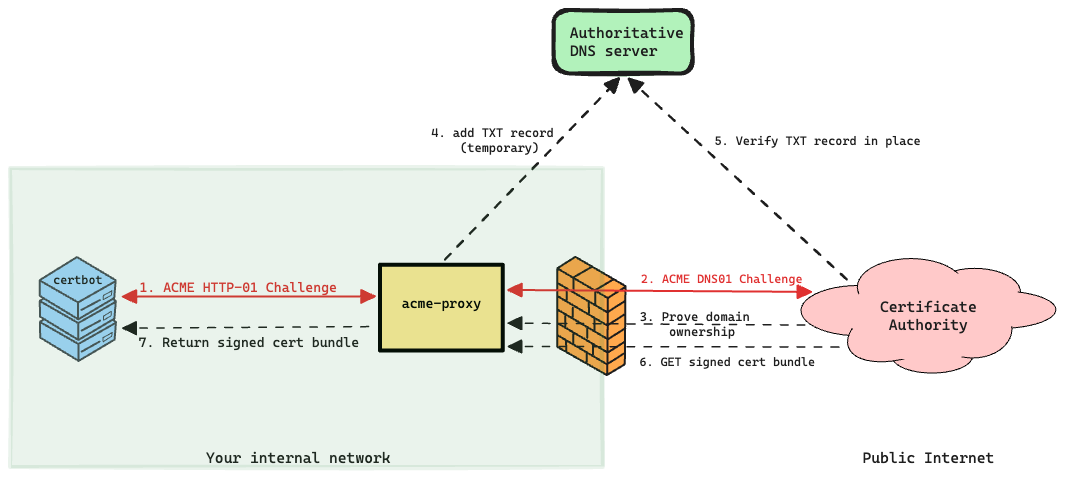
Note: Using this mode also allows users to get signed certificates from LetsEncrypt!
Connectivity Requirements#
For the ACME certificate request issuance, renewal flow to work correctly, make sure your any internal firewalls, ACLs, IPtables rules permit the following traffic.
Client to acme-proxy (HTTPS/443)#
Your servers running certbot must be able to connect to acme-proxy over HTTPS.
Source          myserver.example.com
Destination     acme-proxy.example.com
Protocol        https (443)
Action          allow
acme-proxy to Client (HTTP/80)#
acme-proxy validates HTTP-01 challenges by connecting to your servers directly on port 80. Your servers must allow inbound HTTP/80 from acme-proxy’s IP — not from the public internet. This is the key security benefit: HTTP/80 exposure is limited to a trusted internal host rather than the global internet which is the case when using LetsEncrypt.
Source          acme-proxy.example.com
Destination     myserver.example.com
Protocol        http (80)
Action          allow